Call or Text: +1 (208) 425-2990
Email: Sales@DroneSprayPro.com

DJI Agras Pump Errors: Solutions for Common Problems
Pump errors on DJI Agras drones can disrupt spray operations and lead to wasted time and resources. Common issues include clogs, worn parts, and loose connections. These problems often trigger error messages like "Pump Disconnected" or "Flow Rate Abnormal", or show up as uneven spray patterns, unusual noises, or fluctuating flow rates.
Key takeaways for troubleshooting:
- Check filters and hoses for blockages or kinks.
- Inspect electrical connections for loose plugs or bent pins.
- Run a calibration test using clean water to ensure accurate flow rates.
- Listen for unusual pump sounds to identify mechanical wear.
Preventative maintenance is crucial. Flush the system after each use, inspect components regularly, and replace the pump motor after 700 flight hours. For persistent issues, professional support from providers like Drone Spray Pro can minimize downtime and ensure smooth operations.
Common DJI Agras Pump Errors
Types of Pump Errors and What They Mean
When a DJI Agras drone encounters pump issues, it displays specific error messages in the app. Understanding these messages can save you time and frustration in the field.
| Error Message | Cause | Effect on Spraying |
|---|---|---|
| "Pump Disconnected" | Damaged signal wire, bent connector pins, or loose plug | The pump stops completely, preventing liquid from reaching the nozzles. |
| "Flow Rate Abnormal" | Blockage, worn impeller, or a stuck one-way valve | Results in uneven application rates across the field. |
| "Pump Calculation Error" | Kinked hose, clogged filter, or jammed spinner disk | Spray rate doesn't align with the programmed target. |
| "ESC Auto Check Failed" | Mechanical clog in the pump or faulty motor/signal board | The drone might refuse to start a spray mission. |
Since the system components are electronically linked, a problem with the centrifugal spinner motor can sometimes trigger a pump error, even if the pump itself is functioning correctly. Recognizing these messages is the first step toward troubleshooting effectively.
How Pump Problems Show Up in the Field
Pump issues don’t always announce themselves through error messages. Sometimes, the signs are visible only in the drone’s performance.
- Uneven spray patterns: If one side of the boom sprays more liquid than the other, it's likely due to restricted flow. Similarly, a tank that empties slower than expected usually signals a blockage somewhere in the system.
- Unusual sounds: Grinding or rattling noises coming from the pump module often indicate mechanical wear or corrosion inside the motor. Ignoring these sounds can lead to further damage.
- Flow rate fluctuations mid-mission: An erratic spray flow could be caused by a broken impeller shaft. In such cases, the magnetic disk may spin while the shaft lags, disrupting the flow.
Spotting these symptoms early can prevent larger issues and ensure consistent spraying performance.
Key Parts of the DJI Agras Spraying System
A solid understanding of the spraying system’s components can make diagnosing and fixing issues much easier.
- Delivery pump: This moves liquid from the tank at a controlled rate through the system.
- Flow meter: It monitors the amount of liquid passing through and sends data to the flight controller. If the pump’s output doesn’t match the flow meter’s readings, the app triggers a flow rate or calculation error.
- Spray booms and centrifugal motors: These carry the liquid to high-speed motors that atomize it into fine droplets. Since these motors are electronically tied to the pump, a motor fault can sometimes appear as a pump error.
- Filters: Positioned at critical points, filters catch debris before it reaches the pump or nozzles. A clogged filter is a common cause of restricted flow and should always be checked first.
Understanding these components and their roles is crucial for diagnosing both error codes and field symptoms. This knowledge helps you address issues quickly and keep your DJI Agras T50 running efficiently.
sbb-itb-3b7eef7
Tutorial - Agras T20 - Calibrating Flow Meter and Pump
How to Troubleshoot DJI Agras Pump Errors
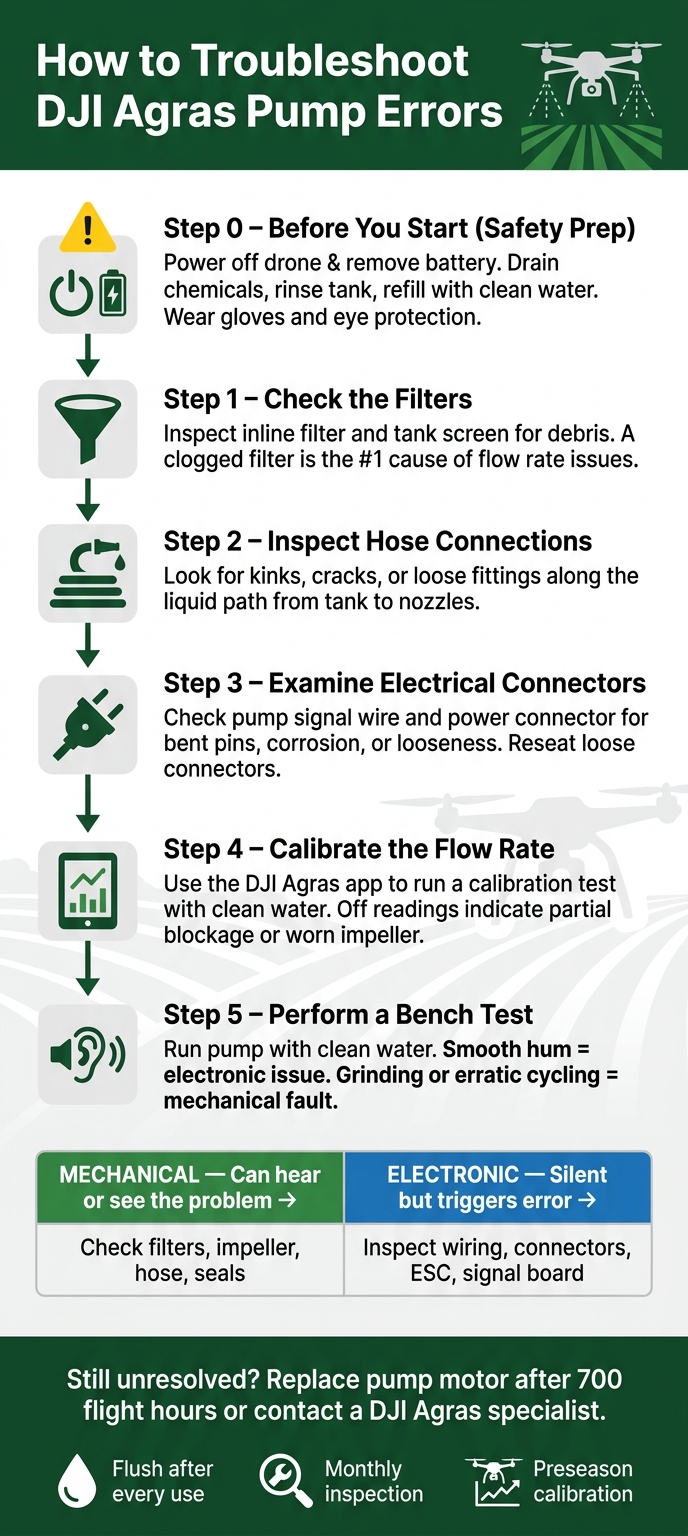
DJI Agras Pump Error Troubleshooting: Step-by-Step Checklist
When dealing with pump errors on your DJI Agras sprayer drones, a clear and methodical approach can save you time and frustration. Jumping straight to disassembly often creates more problems than it solves. Instead, follow these steps to pinpoint and resolve the issue efficiently.
Preparing the Drone Before You Start
Before diving into troubleshooting, power off the drone completely and remove the battery. Never attempt to work on the spraying system while the drone is powered on. Drain any leftover chemicals, rinse the tank thoroughly, and refill it with clean water. This ensures a safer testing environment and protects the pump from potential damage. Always wear gloves and eye protection when handling agrochemicals, even if they’ve been diluted.
Using clean water during diagnostics helps in identifying leaks or irregularities in flow and flushes out any debris that might be causing problems. Once the system is prepped, you can focus on identifying whether the issue is mechanical or electronic.
Mechanical vs. Electronic Problems: How to Tell the Difference
Understanding whether the issue is mechanical or electronic is key to effective troubleshooting. For example, error messages like "Pump Disconnected" often point to electronic issues, while unusual sounds from the pump are usually mechanical.
| Symptom | Likely Cause | Type |
|---|---|---|
| Grinding or rattling from the pump module | Worn impeller or motor corrosion | Mechanical |
| Uneven spray output across the boom | Clogged filter, hose, or valve | Mechanical |
| "Pump Disconnected" with no visible damage | Loose connector, bent pin, or damaged signal wire | Electronic |
| "ESC Auto Check Failed" with no blockage | Faulty motor signal board or ESC | Electronic |
| Flow rate drops mid-mission, no noise | Broken impeller shaft | Mechanical |
| Error clears after restart, no root cause found | Intermittent sensor signal or loose connection | Electronic |
A simple guideline: if you can hear or see the problem, it’s likely mechanical. If the issue is silent but triggers an error message, start by inspecting the wiring and electronic components.
Checklist for Diagnosing Common Pump Errors
Use this step-by-step checklist to systematically address potential causes. Starting with the easiest fixes avoids unnecessary disassembly and saves time.
- Check the filters. Examine the inline filter and tank screen for debris. A clogged filter is one of the most common reasons for flow rate issues and is a quick fix.
- Inspect hose connections. Look for kinks, cracks, or loose fittings along the liquid path from the tank to the nozzles. Even a small kink can disrupt flow and trigger errors.
- Examine electrical connectors. Check the pump’s signal wire and power connector for bent pins, corrosion, or looseness. Reseating loose connectors can often resolve the issue.
- Calibrate the flow rate. Use the DJI Agras app to run a calibration test with clean water. If the flow rate is off, the problem might be a partial blockage or a worn impeller.
- Perform a bench test. Run the pump with clean water and listen for irregular sounds. A smooth hum suggests an electronic issue, while grinding or erratic cycling points to a mechanical fault.
Following this checklist step by step will help you zero in on the root cause and avoid unnecessary part replacements.
Fixing and Maintaining DJI Agras Pump Systems
Once you've pinpointed the cause of a pump error, the next step is to fix it thoroughly and establish a regular maintenance routine to keep the issue from recurring.
Clearing Clogs and Flushing the System
Start by opening the DJI Agras app, navigating to Spraying System Settings, and running the "Clear Trapped Air" function. This primes the hoses, ensuring accurate flow readings. Then, calibrate the flow meter using clean water and test the sprinklers at their maximum flow rate. For the T40 model, this is 12 L/min (3.1 gal/min). If the flow rate is below this threshold, there’s likely still a blockage [1].
To prevent future clogs, flush the entire liquid path with clean water after every use. This simple step is one of the most effective ways to avoid pump errors caused by blockages.
Once clogs are cleared, inspect the pump's key components for any signs of wear or damage.
Inspecting and Replacing Pump Parts
The T40's pump system uses a permanent magnetic drive impeller, which reduces corrosion risks by keeping the liquid chamber separate from the power chamber [2]. Newer DJI Agras models also feature a quick-release snap design, making it easy to disassemble and clean the pump module without needing tools [2].
During inspection, check for worn seals, a damaged impeller shaft, or any buildup inside the liquid chamber. If the motor sounds rough during a bench test or if the flow rate remains low even after flushing, the impeller pump module may need to be replaced. DJI recommends replacing the pump motor after 700 flight hours as part of routine maintenance [1].
Routine Maintenance to Keep the Pump Running Well
Once immediate issues are resolved, setting up a consistent maintenance schedule is key to ensuring the pump performs reliably over time.
| Frequency | Task | What to Use |
|---|---|---|
| After every use | Flush spray lines and nozzles | Clean water |
| Daily | Clean battery ports and drone pins | 95% alcohol, microfiber towel |
| Monthly | Inspect pump motor and seals visually | 2mm hex driver |
| Preseason/Midseason | Full system recalibration (flow meter + weight sensors) | DJI Agras app |
| Every 700 flight hours | Replace impeller pump motor | Replacement pump module |
For weight sensor calibration, use the "Tare Calibration" feature with an empty tank. Then, fill the tank with exactly 20 L of water. The payload reading should fall between 16–24 L. If it doesn’t, recalibrate the system before making further adjustments [1]. The T40's IPX6K rating also means it can be washed directly without worrying about water damage [3].
Getting Expert Help for DJI Agras Pump Issues
Even with regular maintenance and troubleshooting, pump problems can still crop up during the season. That’s where expert help comes in. Having access to experienced professionals not only complements your maintenance routine but also helps reduce downtime when it matters most.
Training and Maintenance Support from Drone Spray Pro

Drone Spray Pro, based in Idaho, specializes in supporting farmers who use DJI Agras drones. Their team doesn’t just sell equipment - they actively use it, which gives them firsthand knowledge to guide you through calibration, maintenance, and troubleshooting.
"As farmers who use these drones ourselves, we help you choose the right equipment, get operational fast, and maximize your return on investment." - Drone Spray Pro [4]
Their preseason support includes detailed checklists to ensure your drone is in peak condition. These checklists cover everything from arm and motor inspections to battery storage and pump system evaluations. As DJI Agriculture emphasizes:
"Ensuring that your T40 and its components are in top condition before you hit the fields can prevent costly downtimes and potential accidents." - DJI Agriculture [1]
Parts and Accessories Available Through Drone Spray Pro
In addition to training, Drone Spray Pro offers a range of parts and accessories to keep your DJI Agras drone running smoothly. Their inventory includes essentials like batteries, chargers, RTK dongles, and even Ready to Fly kits for models such as the DJI Agras T40. These kits save you the hassle of piecing together components individually. For inquiries about parts or service, you can reach them at Sales@DroneSprayPro.com. Be sure to provide detailed information about your issue for quicker assistance.
Local Support for U.S. Farmers
Working with a U.S.-based provider like Drone Spray Pro has its perks, especially when it comes to navigating regulations. They assist farmers with FAA licensing requirements, obtaining Class 3 Medical Certificates, and registering drone tail numbers - steps that are essential for legal operation in the U.S. If you’re new to agricultural drones or expanding your fleet, their guidance can save you time and eliminate unnecessary headaches.
Conclusion and Key Takeaways
Pump errors on DJI Agras drones can be frustrating, but they’re often tied to just a few common issues: clogged filters, worn diaphragms, air in the lines, or loose electrical connections. Spotting these problems early - before heading into the field during a critical spray window - can save you a lot of headaches.
The best way to avoid these issues? Routine maintenance. Flushing the system after each use, checking filters regularly, and running pre-season diagnostics can prevent minor problems from turning into expensive repairs or delays. These simple steps help keep repair costs low and ensure your spraying schedule stays on track.
When troubleshooting, it’s smart to start with the basics: inspect physical components like filters, tubing, and connections before jumping to electronic faults. Most pump errors are mechanical and can be resolved once you pinpoint the issue. And if the problem persists, expert help is always an option.
For ongoing errors, inconsistent flow rates, or unresolved pump failures, don’t hesitate to reach out for professional assistance. Drone Spray Pro provides U.S. farmers with support for DJI Agras systems, offering everything from parts and accessories to FAA licensing guidance. By following these steps, you can ensure your drone operates smoothly and reliably - because every spray day matters.
FAQs
When should I replace the pump motor?
Replace the pump motor after approximately 700 flight hours, or sooner if you notice issues such as reduced flow, strange noises, or the pump failing entirely. These are common signs of motor damage that typically require a replacement.
Why do pump errors happen when the spinner motors are fine?
Pump errors in DJI Agras drones are typically linked to problems within the pump system rather than the spinner motors. These issues often arise from blockages, kinks, or damage to the pump components. Other potential culprits include calibration issues, clogged lines, a worn impeller, or a damaged pump module - even if the spinner motors appear to be working as expected.
How can I tell if it’s a clog or an electrical issue?
Figuring out whether your pump problem stems from a clog or an electrical fault involves a couple of straightforward steps:
- Check for blockages or damage: Take a close look at the impeller, pump module, and hoses. Debris or blockages here can easily cause issues. Clear any obstructions, and if something looks damaged, consider replacing it.
- Test the pump’s functionality: Disconnect the outlet hose and power on the pump. If it fails to operate and you’ve ruled out clogs, the issue could be electrical - possibly a faulty ESC or motor.